Estée Lauder Shopping Assistant
Improving the beauty shopping experience for physically and visually impaired customers
Timeline
February - March 2023
Role
UI/UX Designer
Team
Iñigo Zepeda (Lead Designer)
Lolita Mileta (Designer)
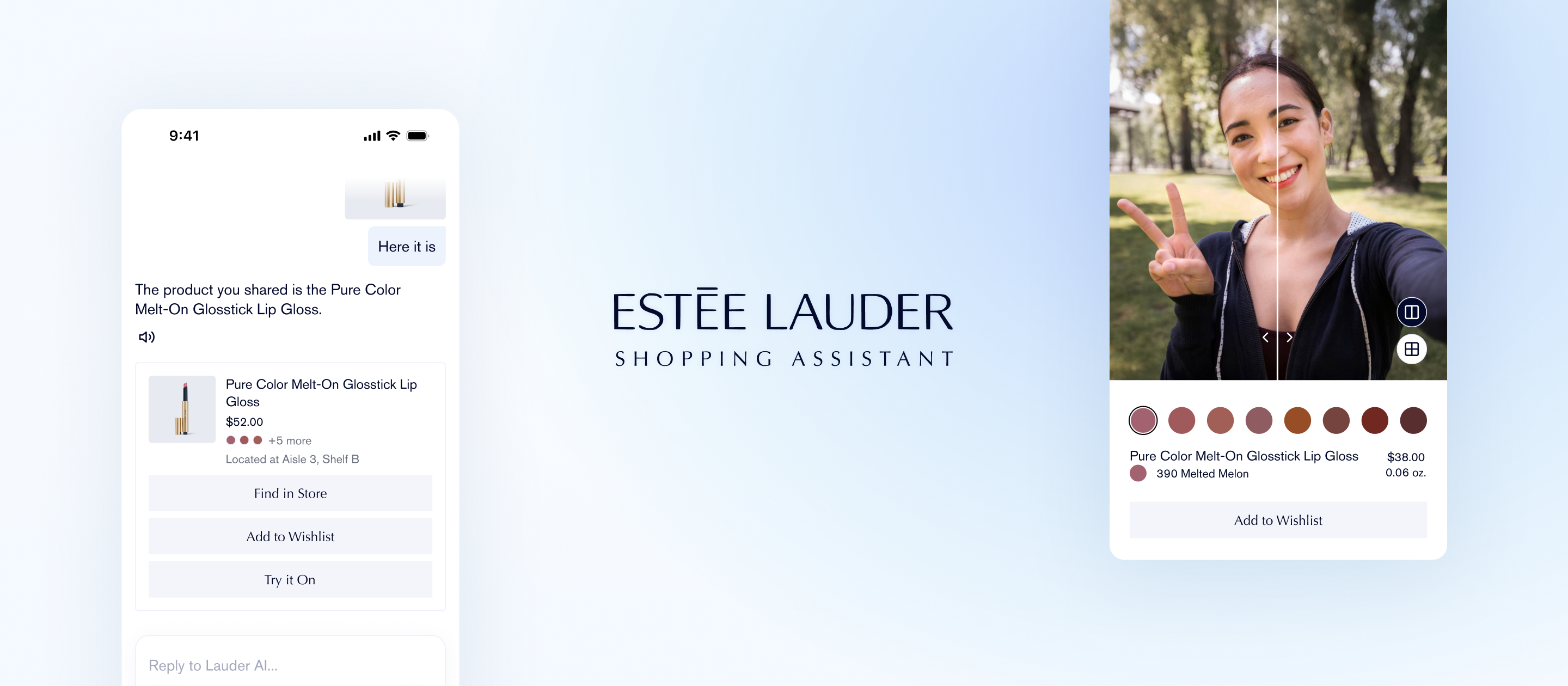
Led complete design process across research, visual identity and prototype delivery
As a UI/UX Designer, my responsibility was across all stages of the development. From the research stage performing interviews, creating user personas and competitive analysis, to the design of the app’s interactions, visuals and prototypes to deliver an accessible and user friendly experience for all audiences.
15% of the population has a disability, yet companies overlook accessible solutions and untapped revenue
Designing for accessibility is both ethical and profitable. According to Accenture, four out of ten customers would spend more to shop with companies that prioritize inclusion. Estée Lauder leads in accessibility and continues to expand their impact in the space.
People with disabilities face challenges when shopping for beauty products
Through secondary research, we discovered that only 4% of beauty and personal care brands create products that accommodate physical disabilities. To understand the specific barrier, we conducted primary research that uncovered core pain points that limited an accessible shopping experience.
Product Discovery
Visually impaired users struggle to learn product details, and identify items without clear audio descriptions.
Store Navigation
Both user groups face difficulty navigating unfamiliar store layouts and finding specific items efficiently.
Physical Interaction
Physically impaired users struggle to reach products, and carry multiple products while shopping.
An app that helps people with disabilities have an effortless beauty shopping experience
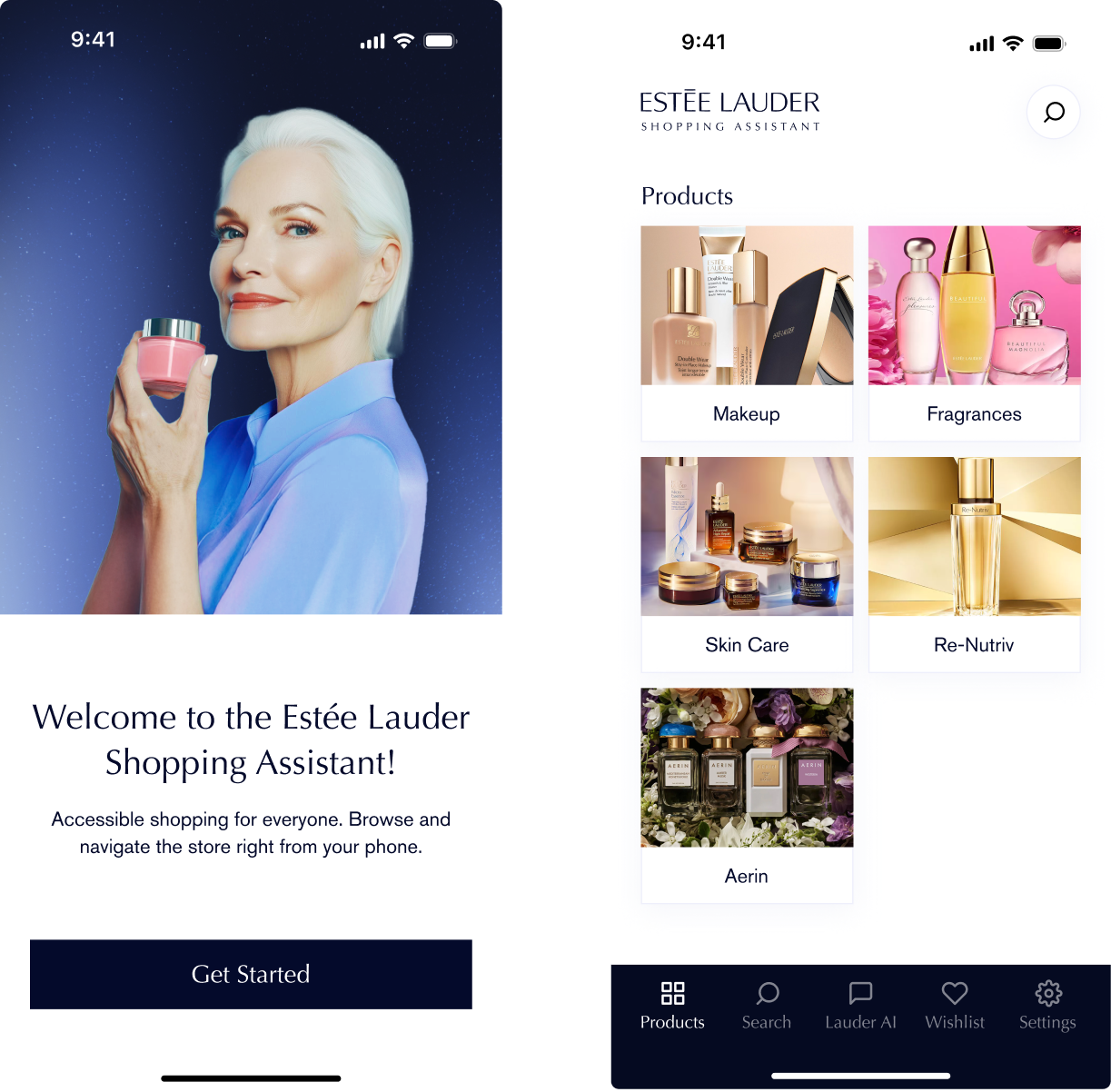
Estée Lauder Shopping Assistant (ELSA) is a mobile app that helps people with visual and physical impairments navigate in-store beauty shopping through innovative features like AR product finding, personalized recommendations, and streamlined checkout.
Understanding the users and accessibility
We started by analyzing online articles, reading blog posts and watching videos of people with disabilities narrating their experience in every day tasks and during shopping to understand their struggles and needs. The main groups analyzed were visually and mobility impaired users. This provided a good starting point to know which questions we needed to ask users.
Then, I created a survey to understand how they overcame these challenges them, their positive experiences and what they wish retail staff should be more aware of. The survey was shared on forums of people with disabilities. The first-hand data obtained was both qualitative and quantitative and set the bases of the research.

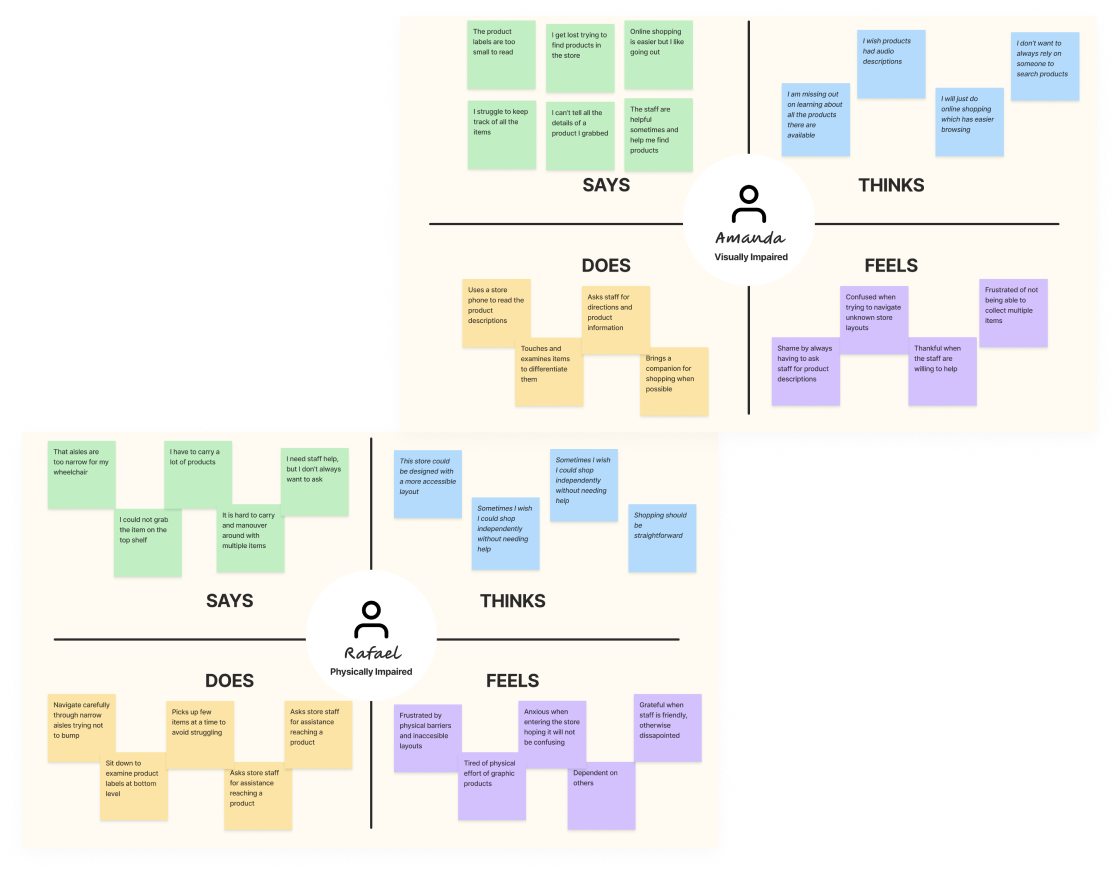
Next, I organized the results in an empathy map to visualize the their experience when shopping. I made empathy maps for both groups of users, which would allow for the development of a richer solution that benefits everyone. For example, visually impaired users value a lot audio descriptions, while physically impaired value an accesible store layout and product placement.
I also researched more about the Apple’s Human Interface Guidelines and Google Design, since the VoiceOver and TalkBack features would be essential for an inclusive app.
Creating the user personas of visually and physically impaired people
Using the research insights, I developed user personas to establish a clear understanding of our target users, their goals, needs, and frustrations. These personas served as a reference throughout the design process to ensure we addressed all essential features.
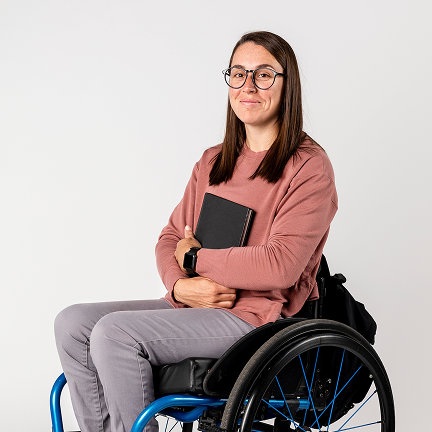
Patricia, 37
Mktn Manager, lives in Mexico City
About Patricia
Patricia is a marketing manager who loves fashion and beauty. She uses a wheelchair due to a spinal cord injury. She enjoys shopping but finds in-store experiences exhausting and prefers solutions that don't require constant staff assistance.
Goals & Needs
- Navigate stores independently without needing constant employee assistance.
- Access products on high or low shelves that are beyond her reach.
- Collect desired items without physically retrieving them herself.
- Try products virtually before purchasing them in-store.
Frustrations
- Store layouts are confusing with narrow aisles and poor signage.
- Products on unreachable shelves make shopping feel impossible alone.
- Waiting for staff assistance makes her feel dependent and slows shopping.
- Physical exhaustion from navigating large stores limits shopping time.
Existing accessibility apps tackled isolated needs for specific groups, with no focus on beauty shopping
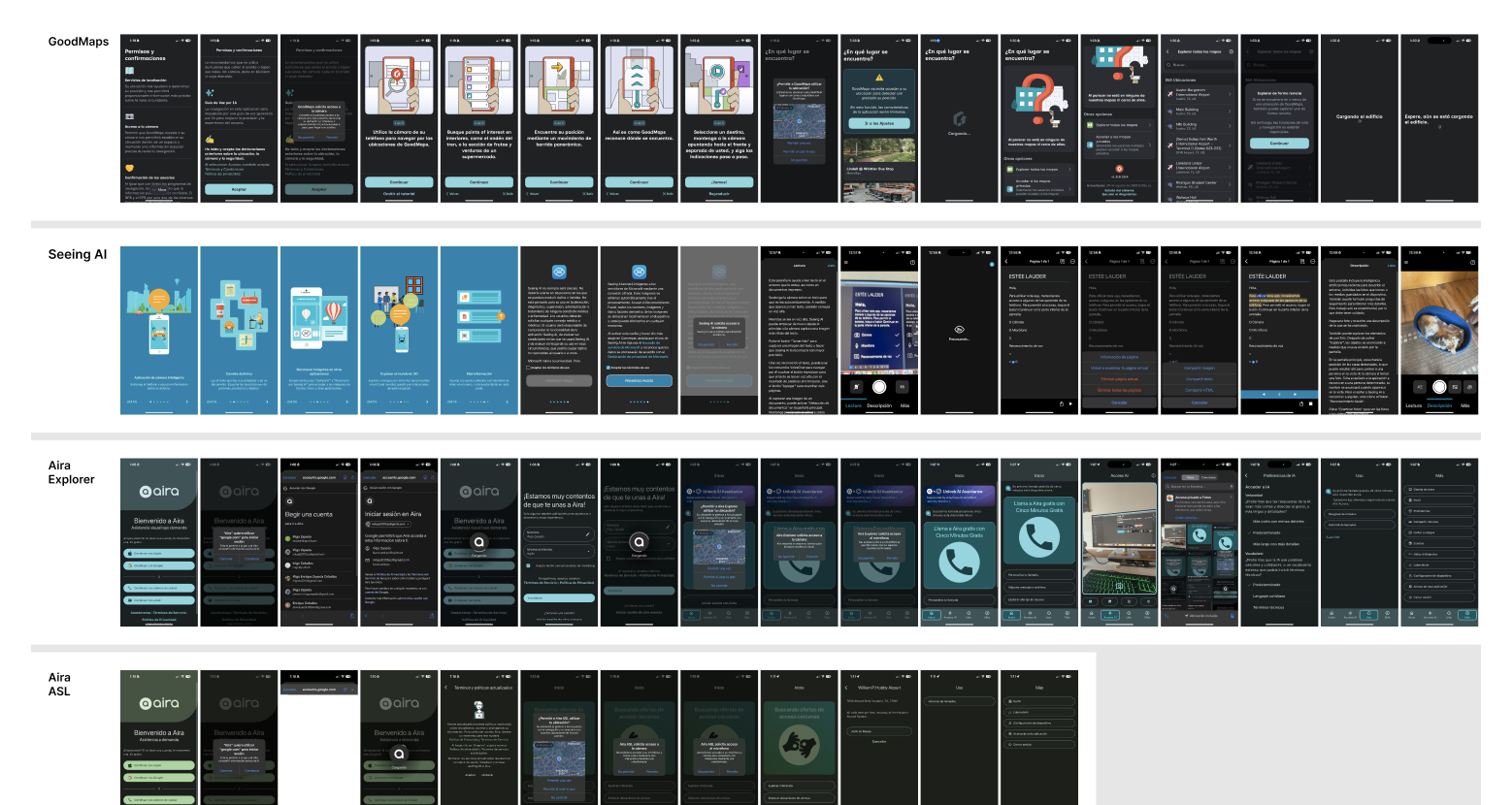
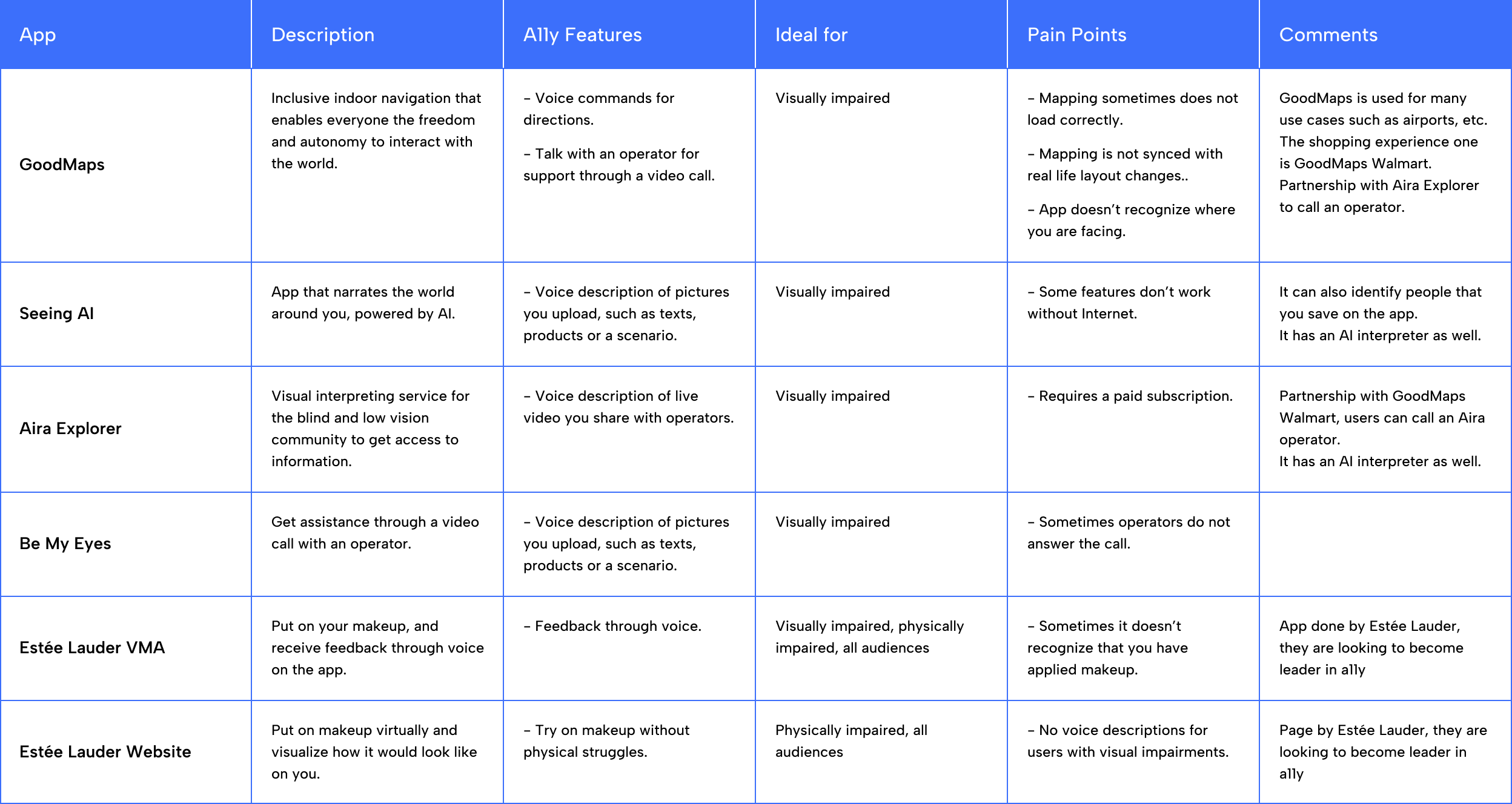
Next, I analyzed competitors adressing similar accessibility challenges to identify their strengths, limitations and solutions. I discovered none were direct competitors, meaning that each app solved isolated problems rather than having a comprehensive solution.
We created a comparative table evaluating accessibility features, target audiences and limitations, which helped identify opportunities for our solution. This research confirmed a significant market gap: existing apps targeted specific disability groups rather than creating an inclusive solution for all users with disabilities.
Shaping an inclusive solution solving the specific challenges
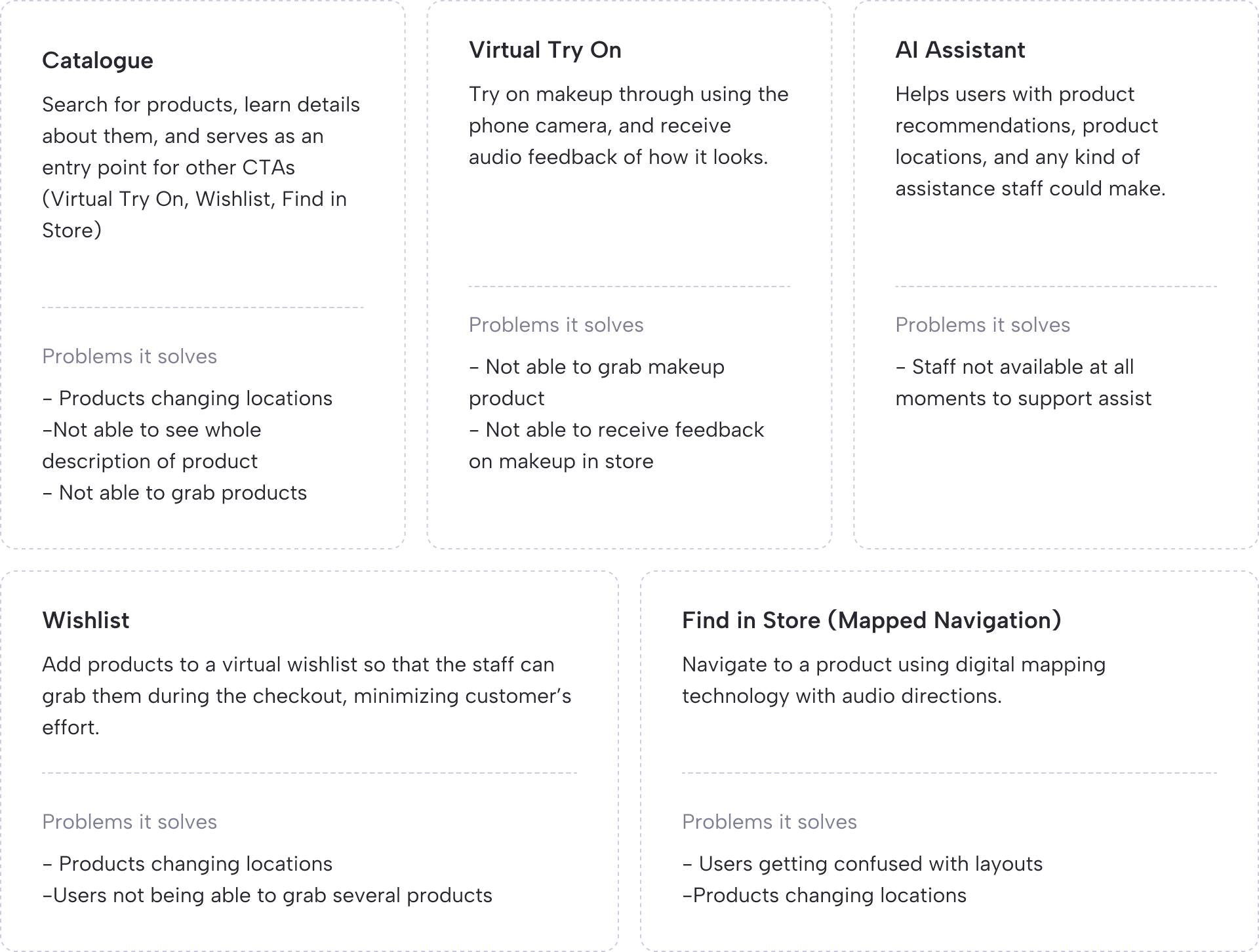
With a clear understanding of the problem, competitors, and target users, I began defining features for an effective shopping experience. The following section outlines each feature, its purpose, and the specific problem it addresses.
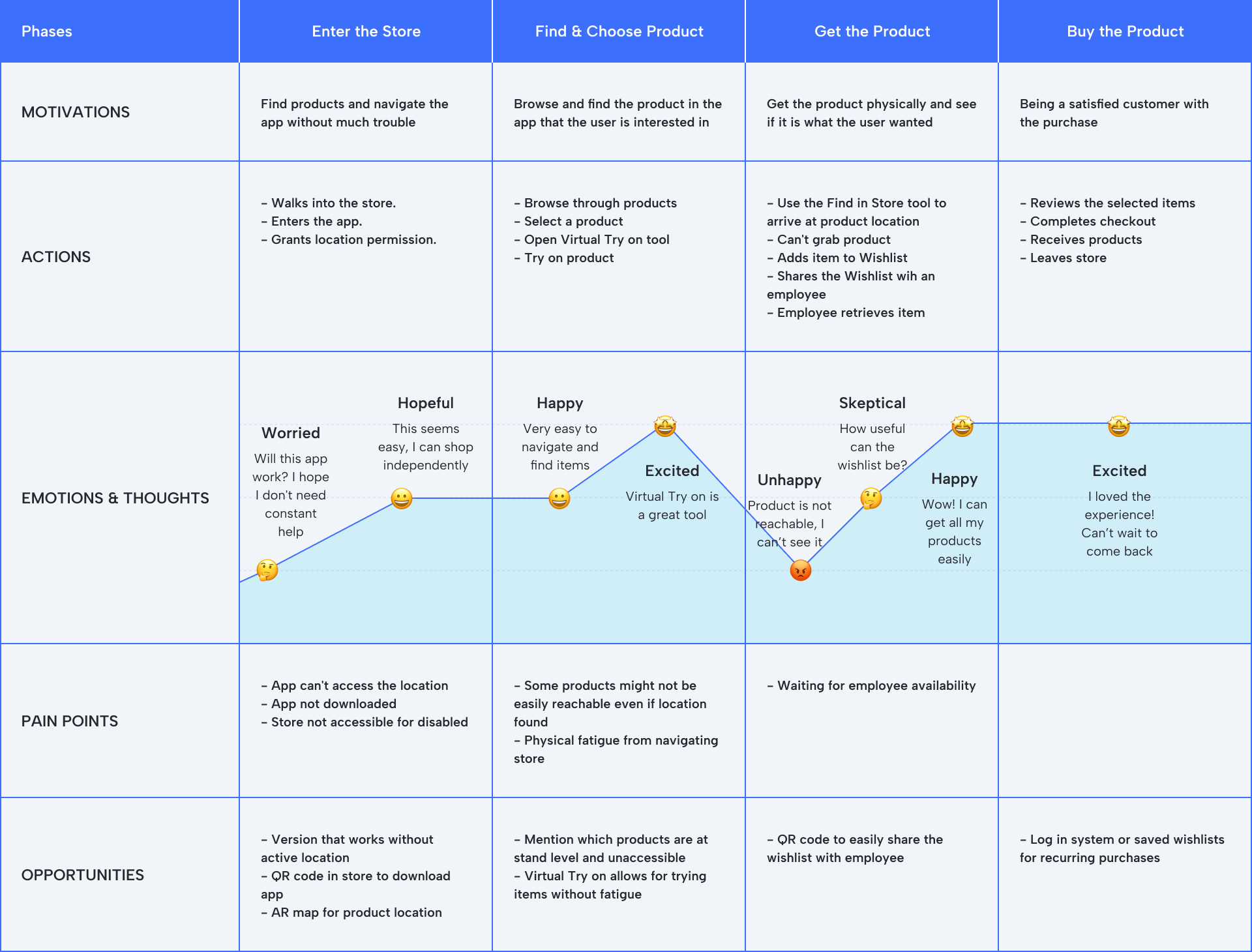
Mapping the User's Journey
Next, I created the user journey mapping the path users would take through the app. This served as a blueprint throughout the design process to ensure all user expectations were met and that screens covered each step.
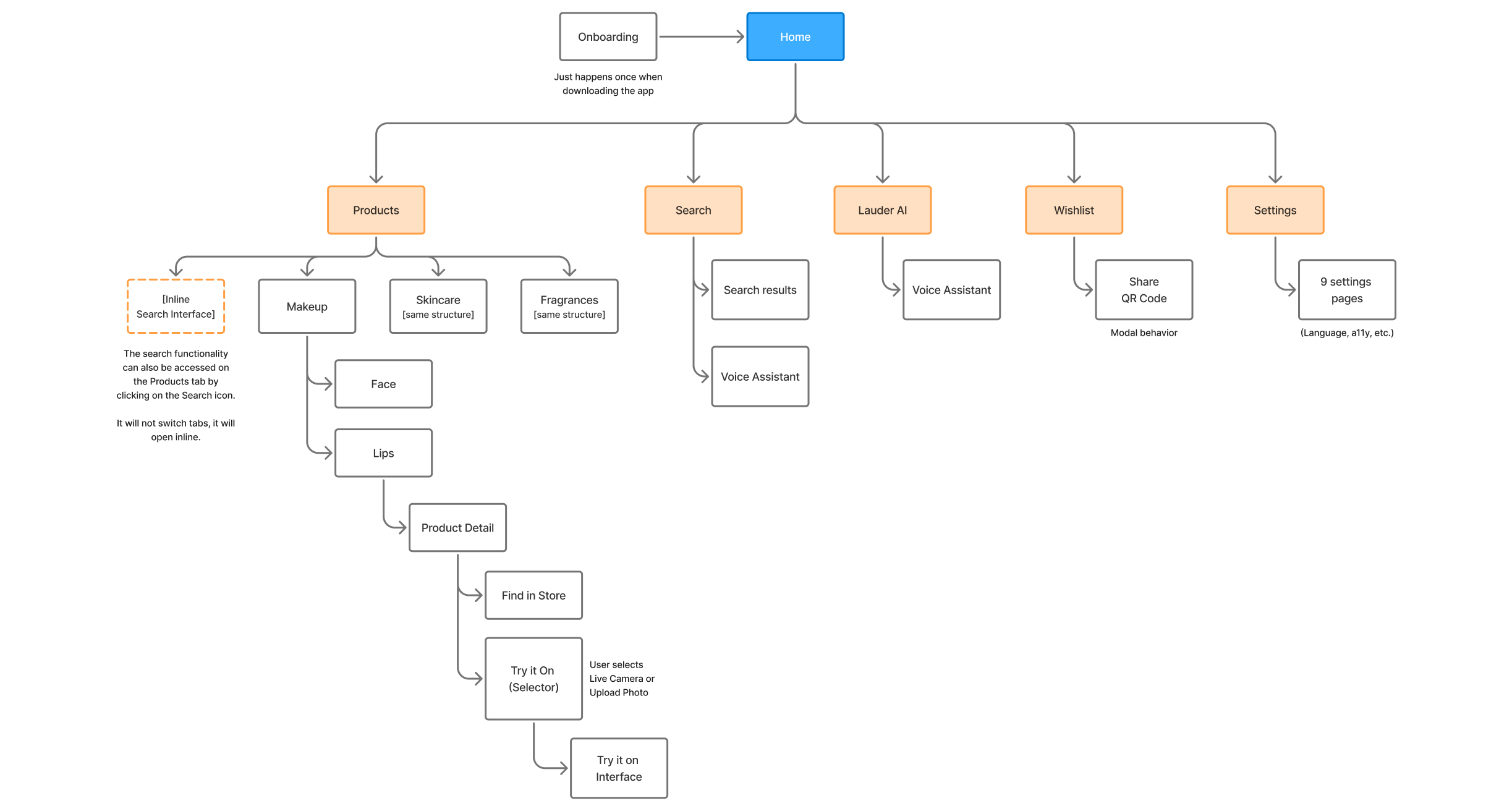
Creating the Sitemap
I developed a sitemap to provide a clear visual representation of the app's structure, ensuring a clear structure and organization.
Defining User Flows
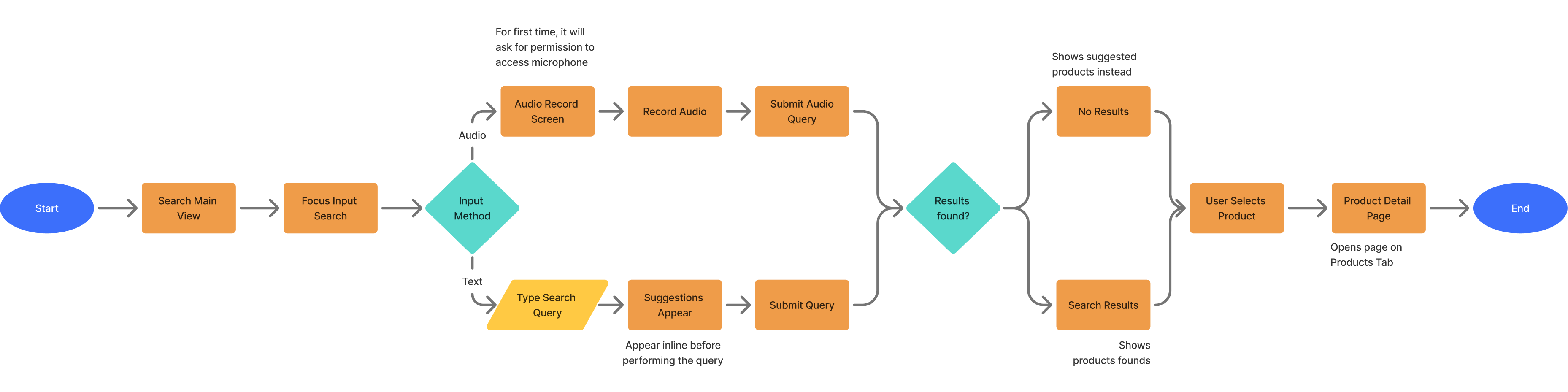
Next, I created user flows to serve as a guide when designing each feature. The following user flow shows the Item Search Flow. Starting from the first step, when the user performs a search query, by either voice or text, to the final step, when the user enters the Product Detail Page.
Sketching the Wireframes
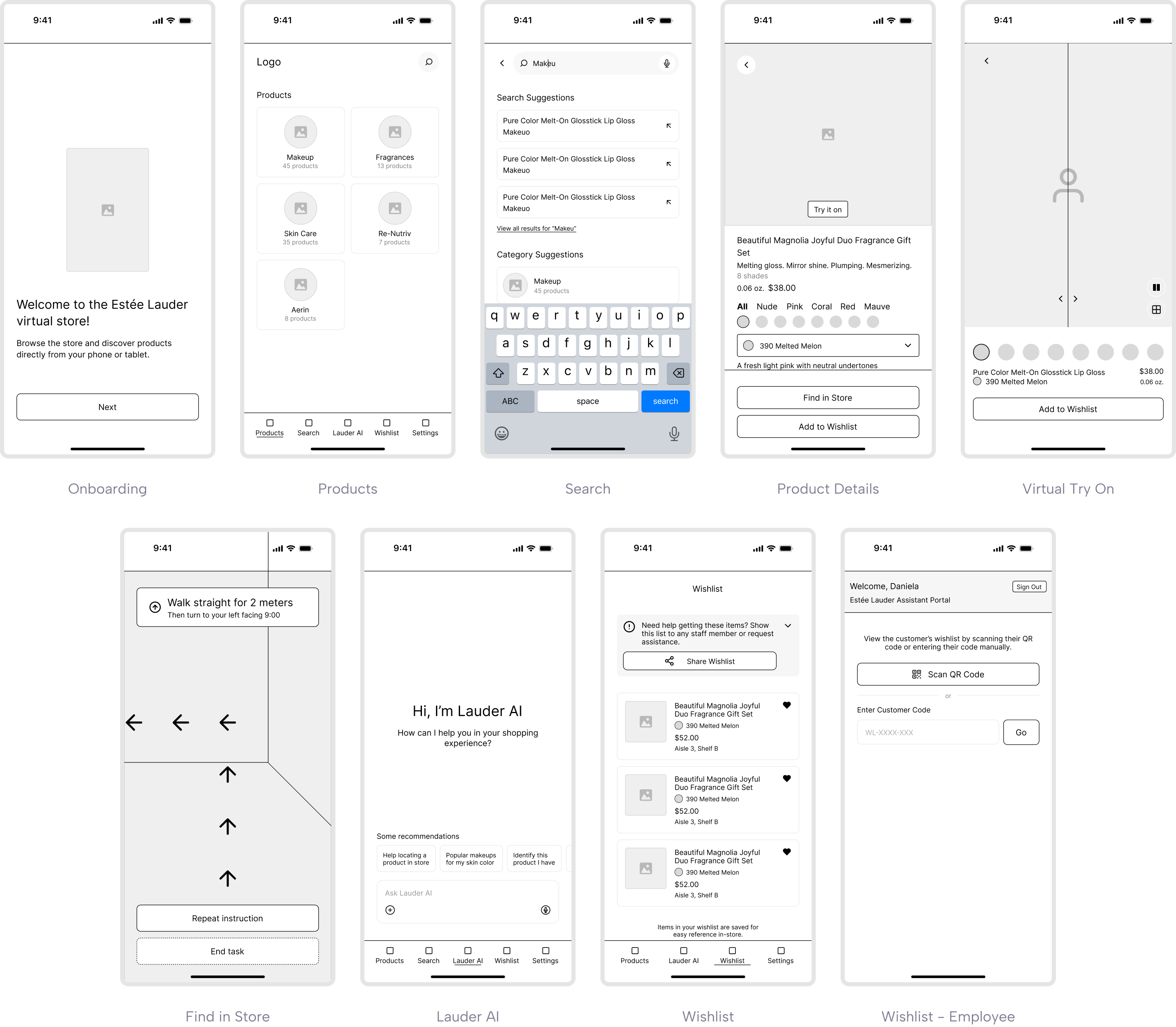
I designed wireframes, focusing on effective layouts familiar mobile interaction patterns. Iterating at the sketch level allowed for rapid refinement before creating high-fidelity designs.
Styleguide and Components
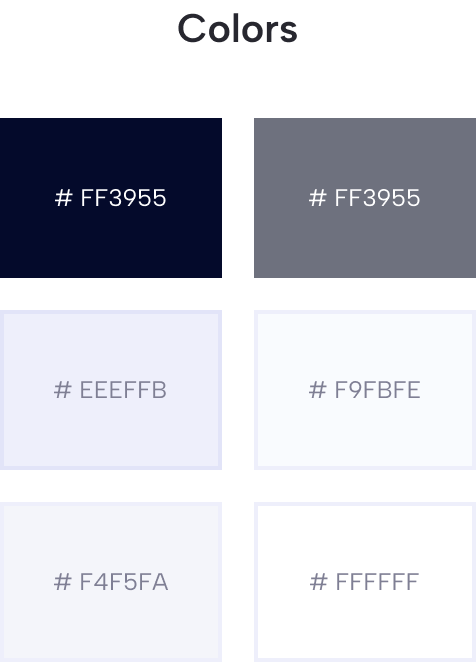
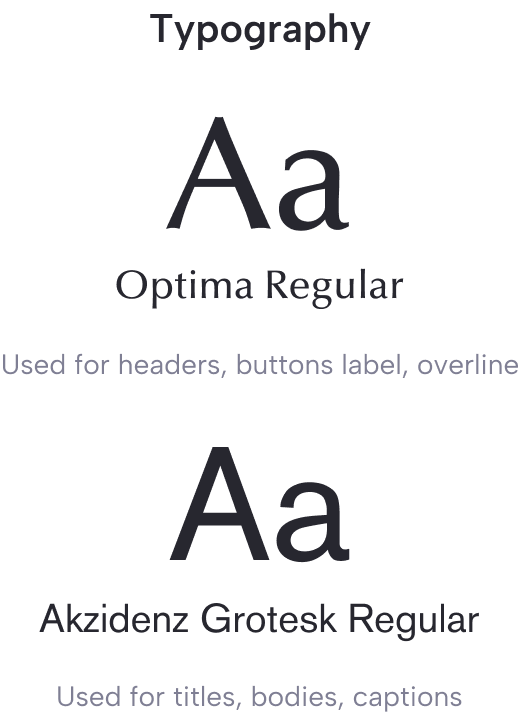
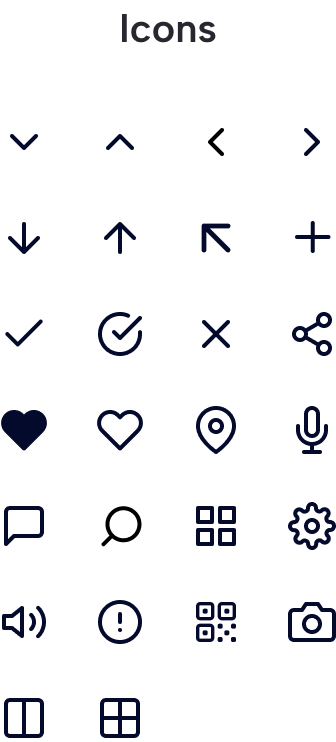
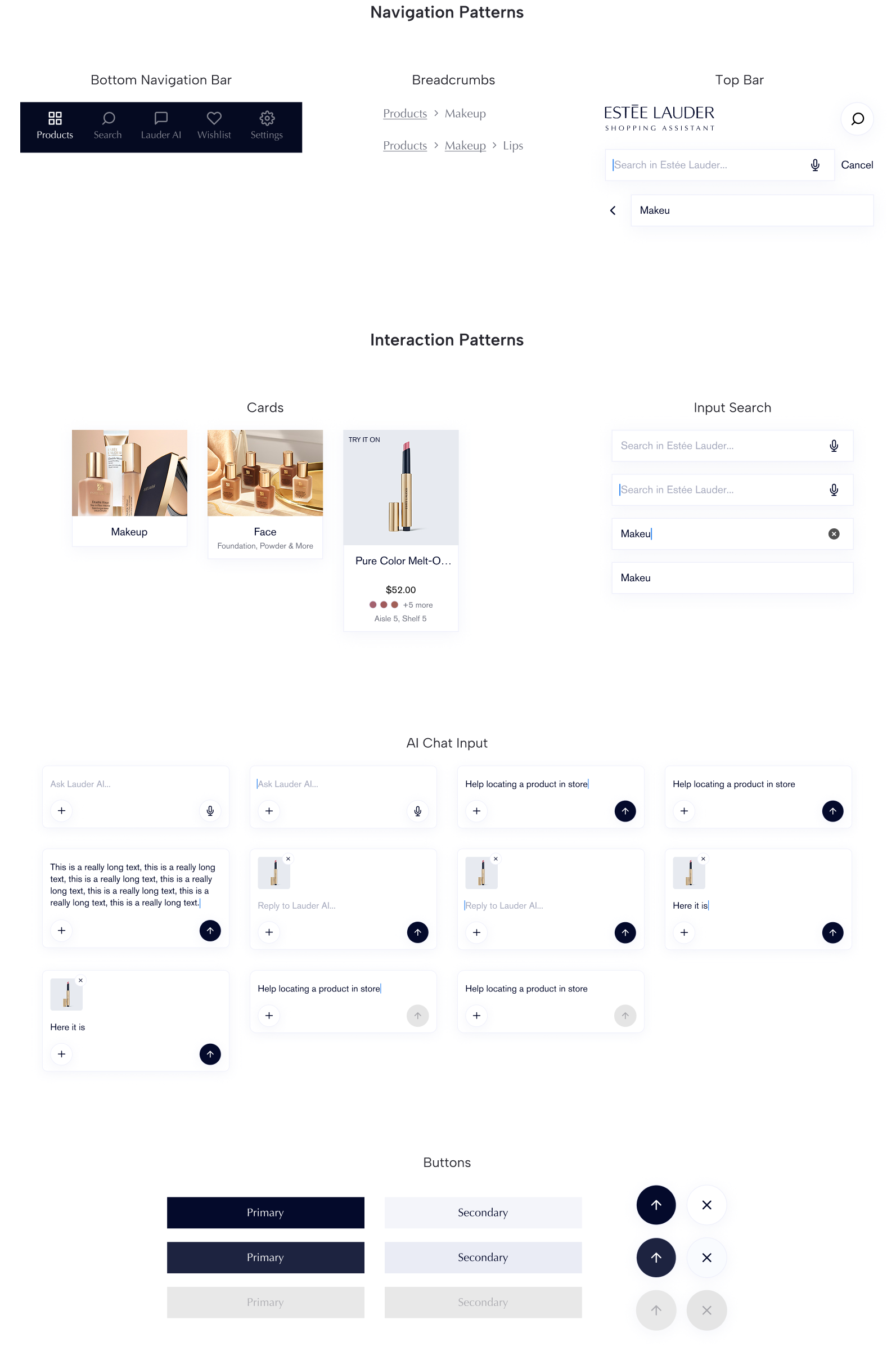
I set up the foundations of the visual identity such as the color, fonts, icons, and interaction patterns. The colors and typography are part of the Estée Lauder branding, which keeps the styling consistent with the rest of the web applications, preserving familiarity with the target audience.
I created a simple design system to ensure a smooth developer handoff and to easily modify components in the future. This involved documenting navigation patterns and interaction patterns including their different states.
UI Screens
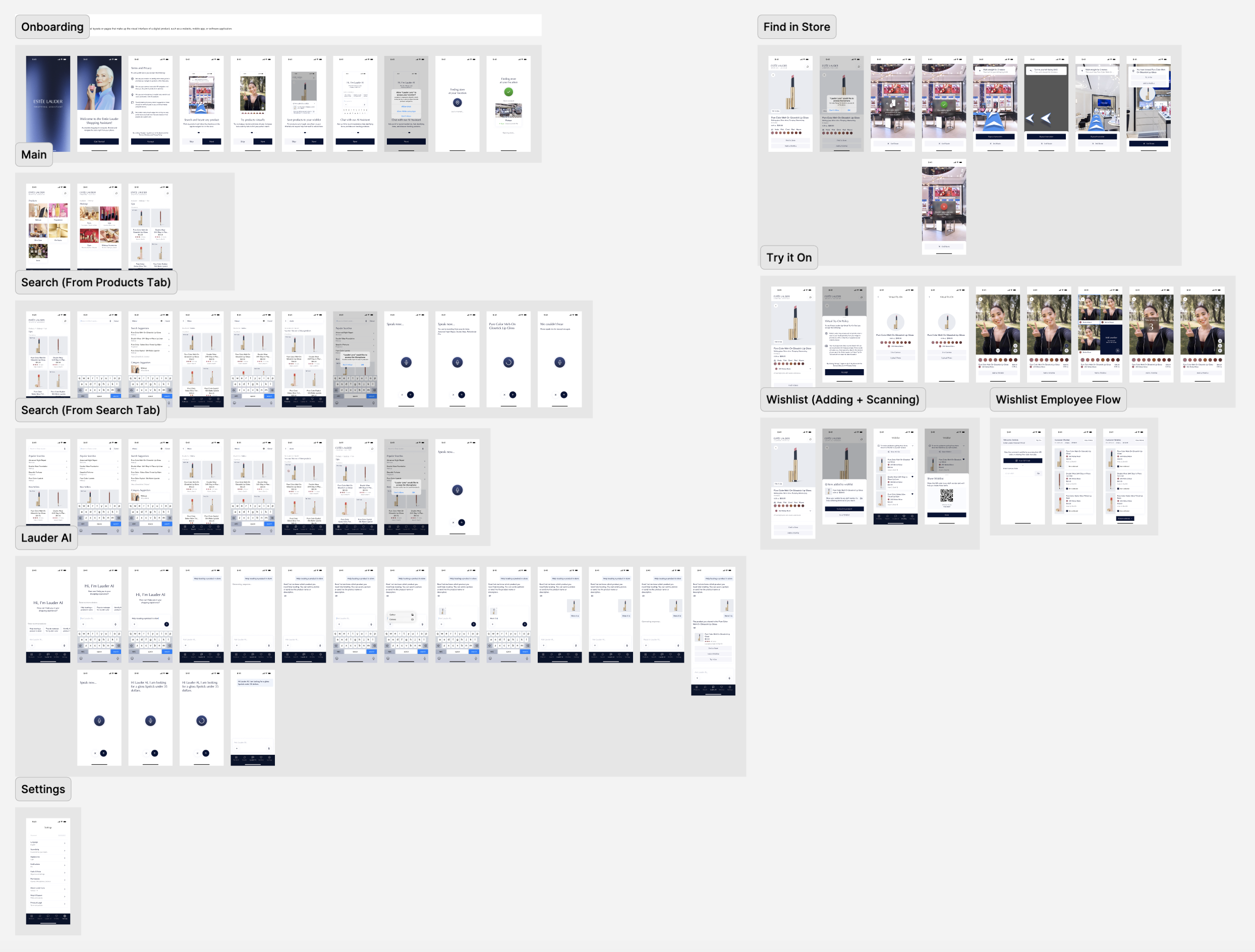
After establishing the styleguide, I transformed the wireframes into high-fidelity interfaces. Each of the sections describe the flows of the different features of the app. Each screen was designed following the branding and interaction design principles.
Prototypes were also made to accurately represent the interaction between screens in the final product. This ensure not only an attractive interactions, but also that the flow aligns with the customer’s mental model of the app.
Accessibility Documentation
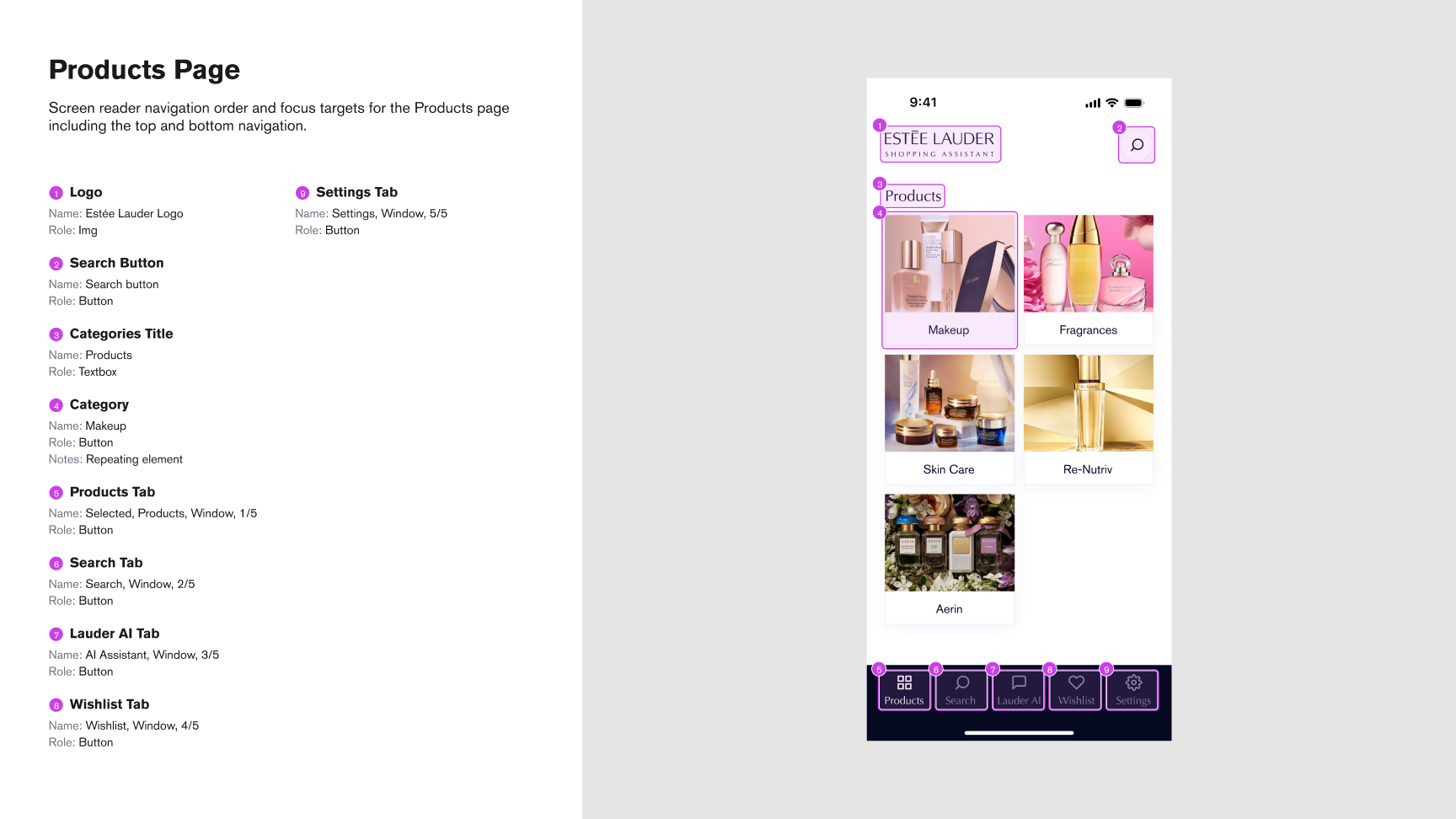
The design meets WCAG guidelines, through high-contrast colors, sufficient target sizes, clear text alternatives for images, and an organized navigation. This ensured the app was perceivable, operable and understandable.
I documented the focus order to define which elements users could access via screen readers. This ensured all interactive elements were readable and comprehensible through assistive technology.
Browse and Find Products
The primary user goal is finding a product. Once found, users can learn more about it, locate it in-store, try it virtually, or add it to their Wishlist. Users can discover products through two entry points: the Products Screen, which organizes items by category, or the Search Screen, where they can search by name or category.
Category Browsing
Search Function
Onboarding Flow
First-time users experience an onboarding flow that introduces the app's main features. Since ELSA is unique in the market, users lack an existing mental model, making this introduction extremely helpful to understand how the app works.
Find in Store
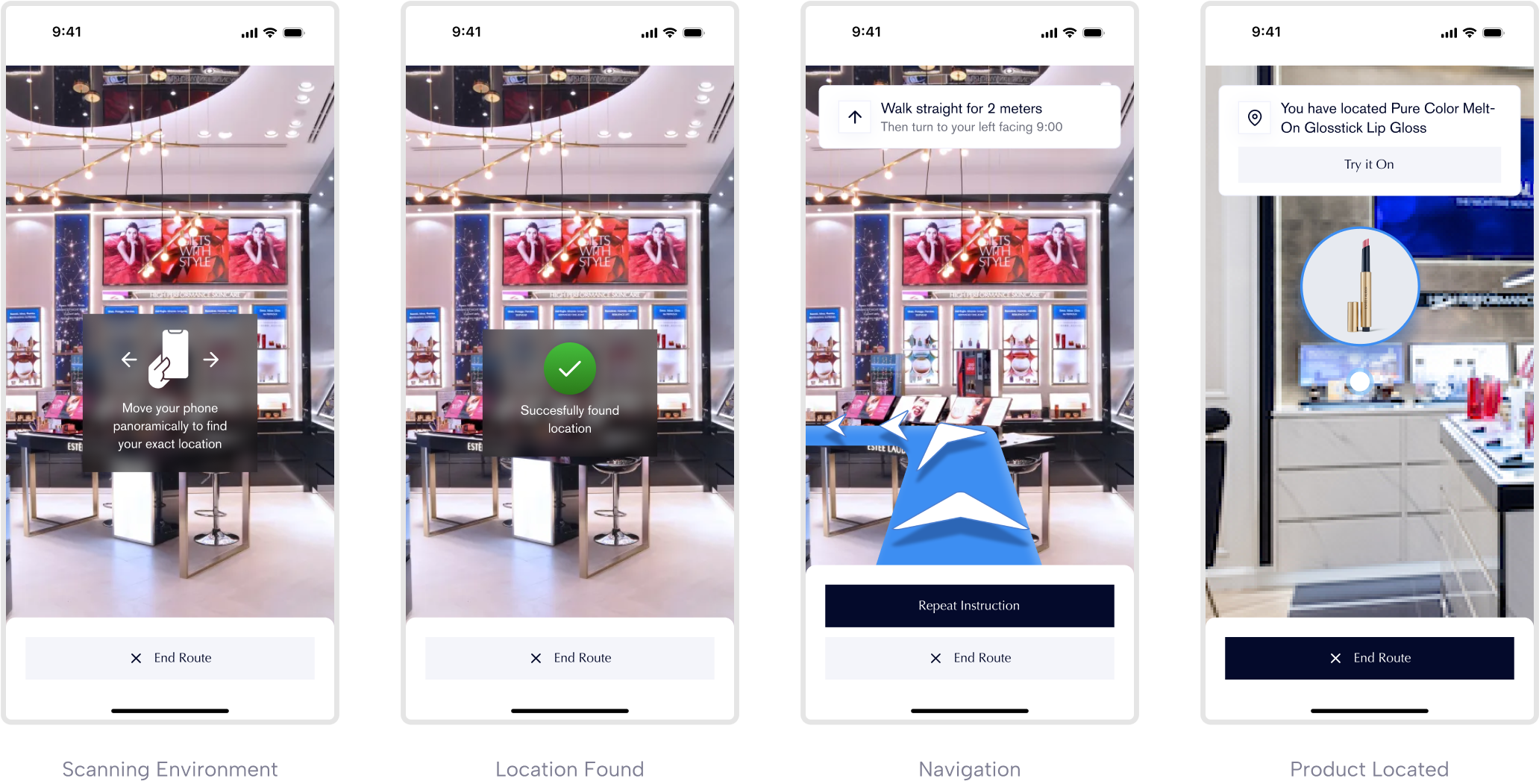
Uses mapped navigation to display the route to a specific product location. Voice instructions are specially useful for users with visual impairments. In addition, physically impaired users leverage this tool to avoid exhaustion finding a product around the store.
Virtual Try On
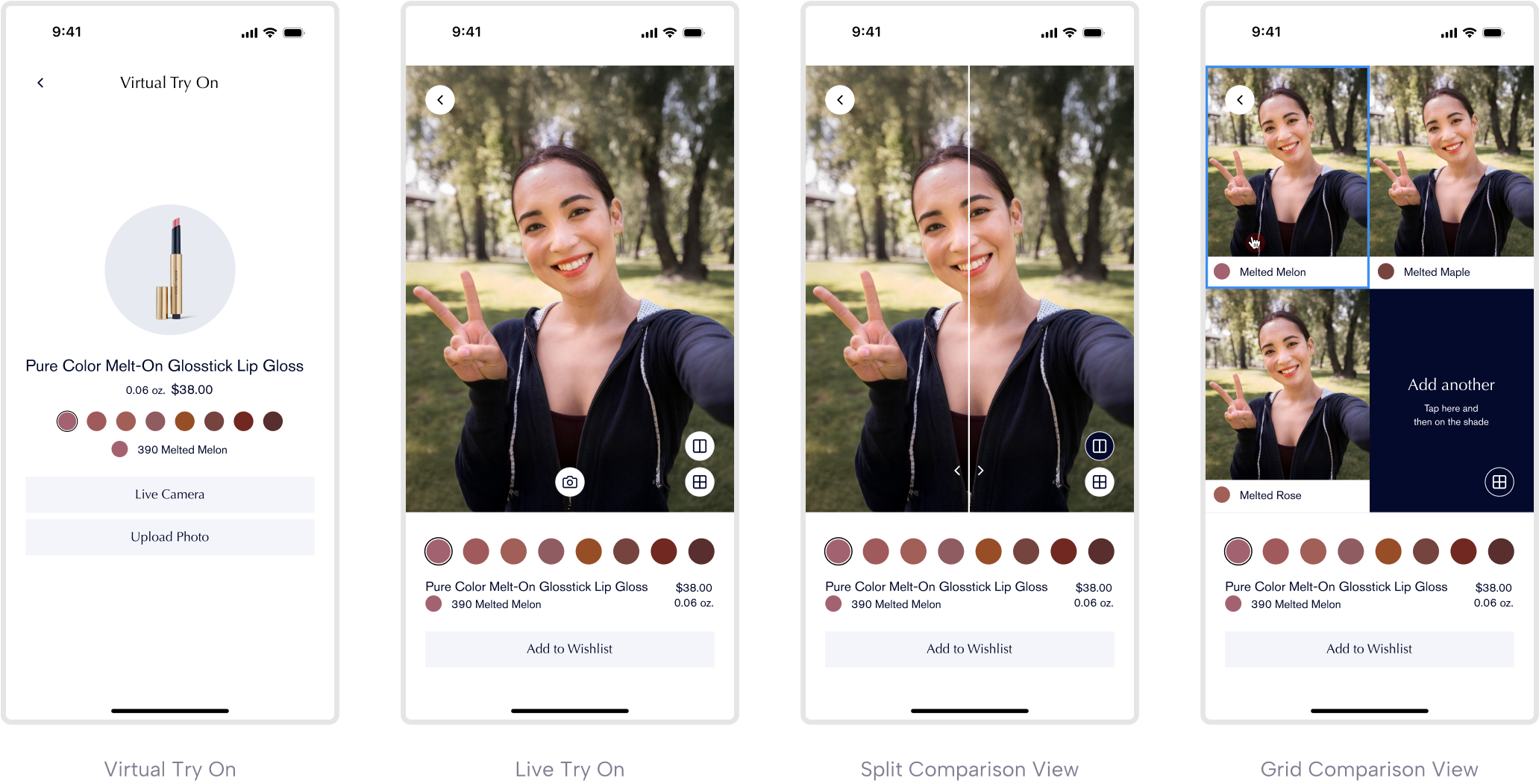
The Virtual Try On tool leverages the technology on Estée Lauder’s website and the Estée Lauder Virtual Makeup Assistant, keeping user’s familiarity with the product. It allows users to preview makeup products. Its audio feedback is useful for visually impaired users. Physically impaired benefit from this tool when they might not reach stands to try on the product.
Wishlist
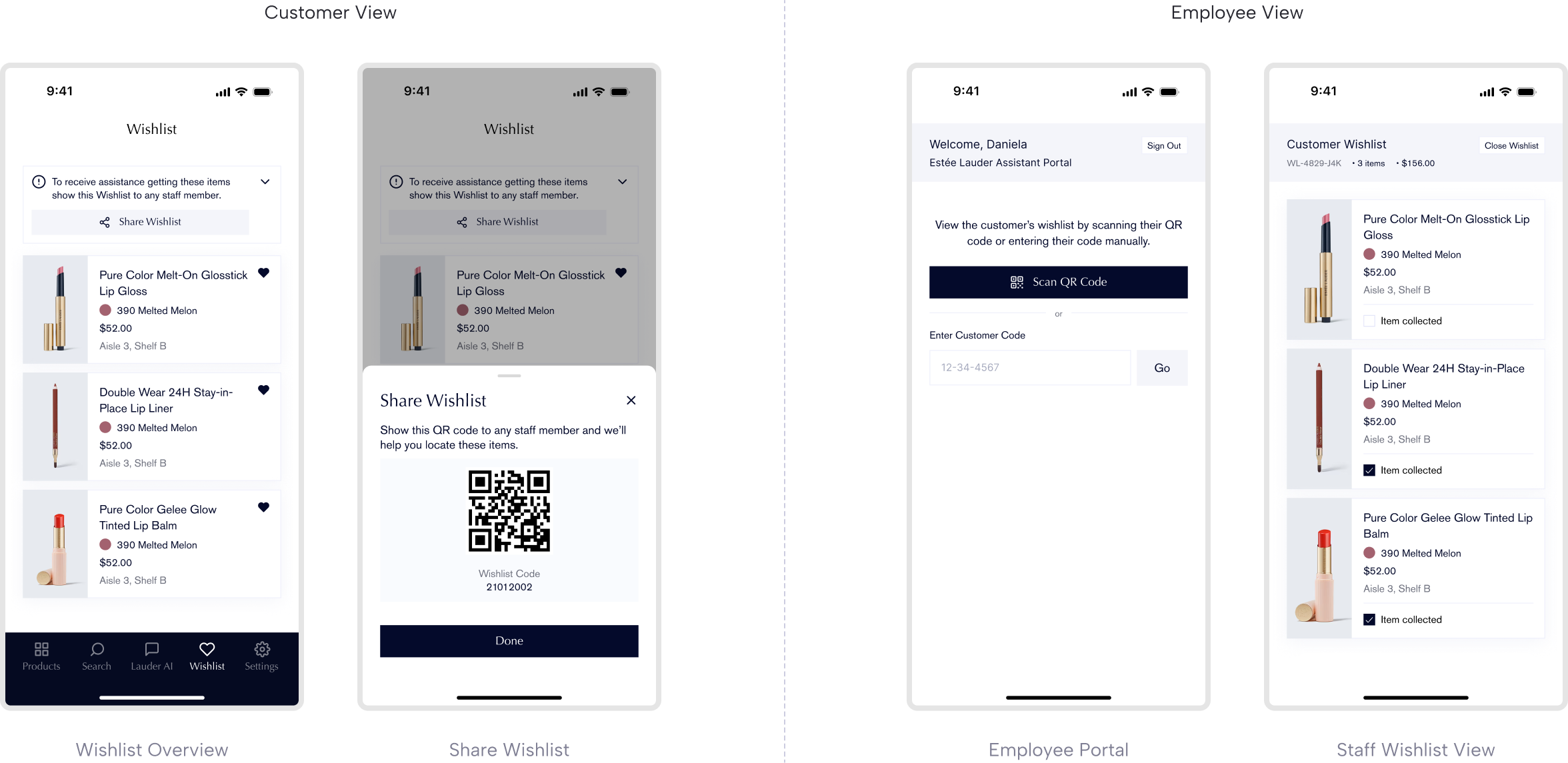
Lets users save products and share their wishlist via QR code with store staff for assistance to grab items. This enables independent browsing without the physical burden of carrying multiple items, creating a more seamless shopping experience.
AI Assistant
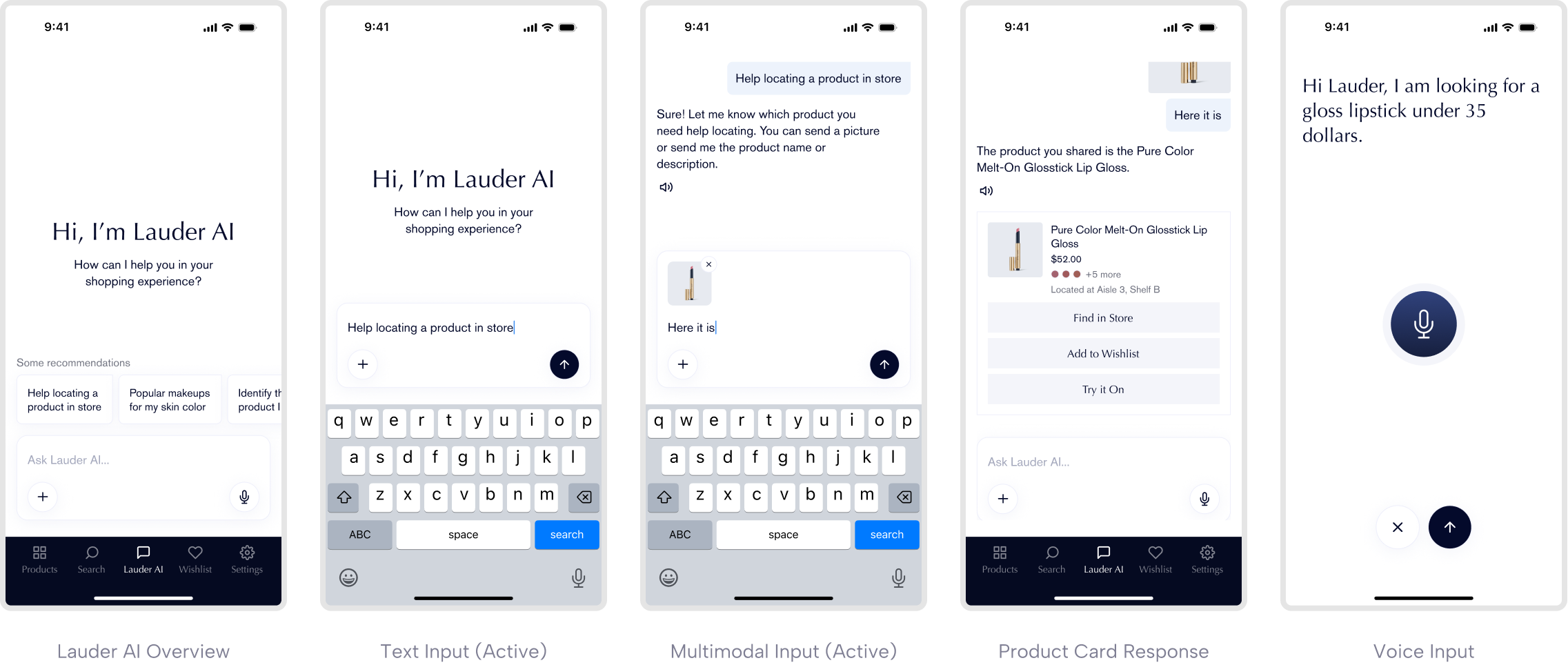
Implementing an AI-powered assistant that provides product recommendations, answers questions, and offers guidance throughout the shopping experience with full voice interaction support. Users who might not see a staff member can obtain all the information from the chatbot.
From a business perspective, it puts Estée Lauder on the spotlight as a vanguardist company focused on AI. Research shows that 65% of non-tech companies who mention the use of AI, saw an average increase of 6.8% in their stock prices.
Performing Usability Tests
I conducted remote usability tests with 5 participants with disabilities from forum groups to identify confusing patterns and missing features. Due to Figma's screen reader limitations, I focused on users with mobility impairments. However, I also interviewed a visually impaired user separately to gather feedback.
1. Defining the Objective: I asked myself, what do I want to learn from the test sessions? The objectives were to see if users can successfully use the different features of the app, and learn if they features are needed or not.
2. Testing Method: Initially, the plan was to use Maze to perform tests to a bigger audience, however we decided to host recorded Zoom sessions for to receive first hand feedback.
3. Defining the Tasks: We defined the tasks that the users would test:
a. The user browses for a product from the products page.
b. The user performs a search query to find a product.
c. The user adds items to the wishlist and create the sharing link.
d. The user finds a product through the digital mapping feature.
e. The user uses the Virtual Try On feature.
4. Setting the Session: The session started by asking users to describe their physical shopping experience, including challenges and how they solved them. Then, they interacted with the Figma prototype, thinking out loud and expressing their feelings throughout the process. After finishing each task, I asked them how they expected the features to behave, to understand if the design aligned with their mental model.
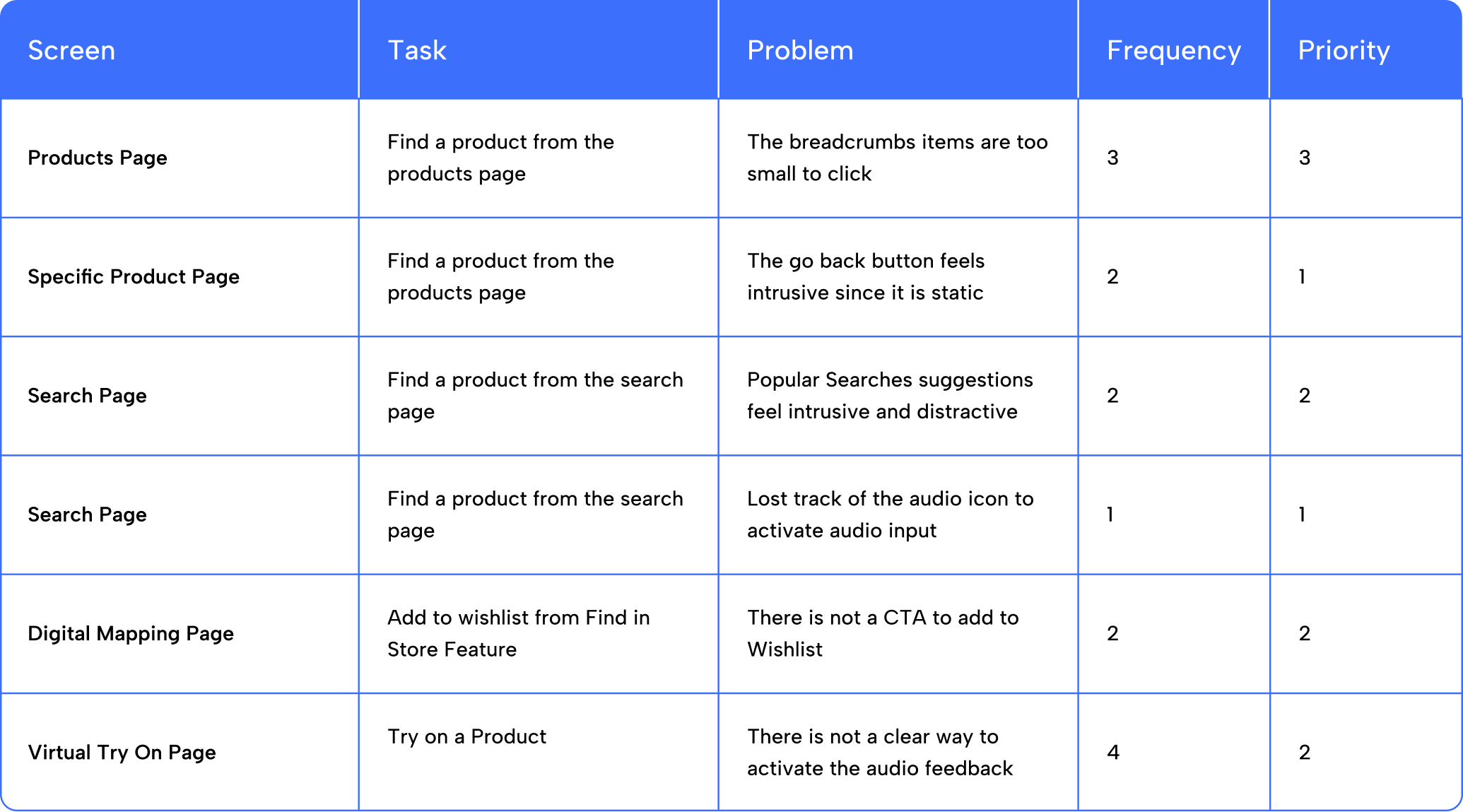
The results obtained were plotted in a table, where I identified which problem users had when performing a task. The data such as frequency and priority where also annotated in order to know which problems were needed to be solved first.
Design Modifications
Based on the results obtained, some modifications were made to ensure a better user experience. These changes did not require time to make, however, as the project evolves, the modifications will be made in order of priority and severity.
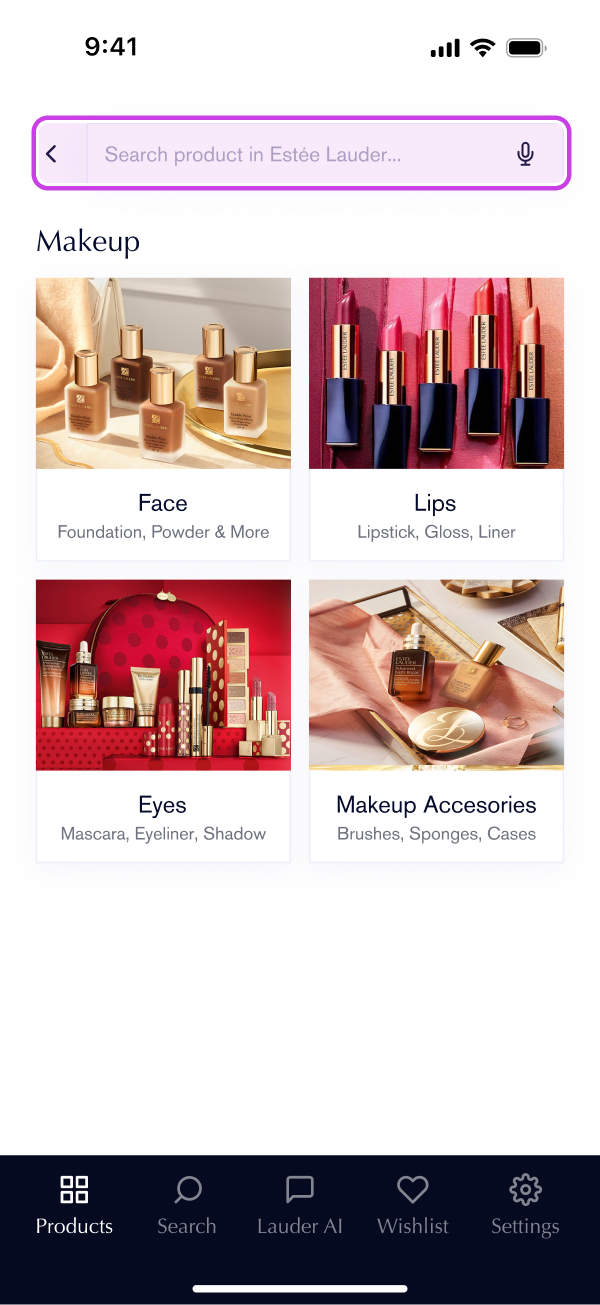
Clearer navigation & Search experience
The navigation was redesigned to follow mobile-native patterns. Instead of breadcrumbs, a back button provides clear hierarchical navigation that aligns with familiar apps.
The search bar now spans full-width, replacing the previous icon approach. This emphasizes search as a primary function while the microphone icon makes voice input immediately discoverable.
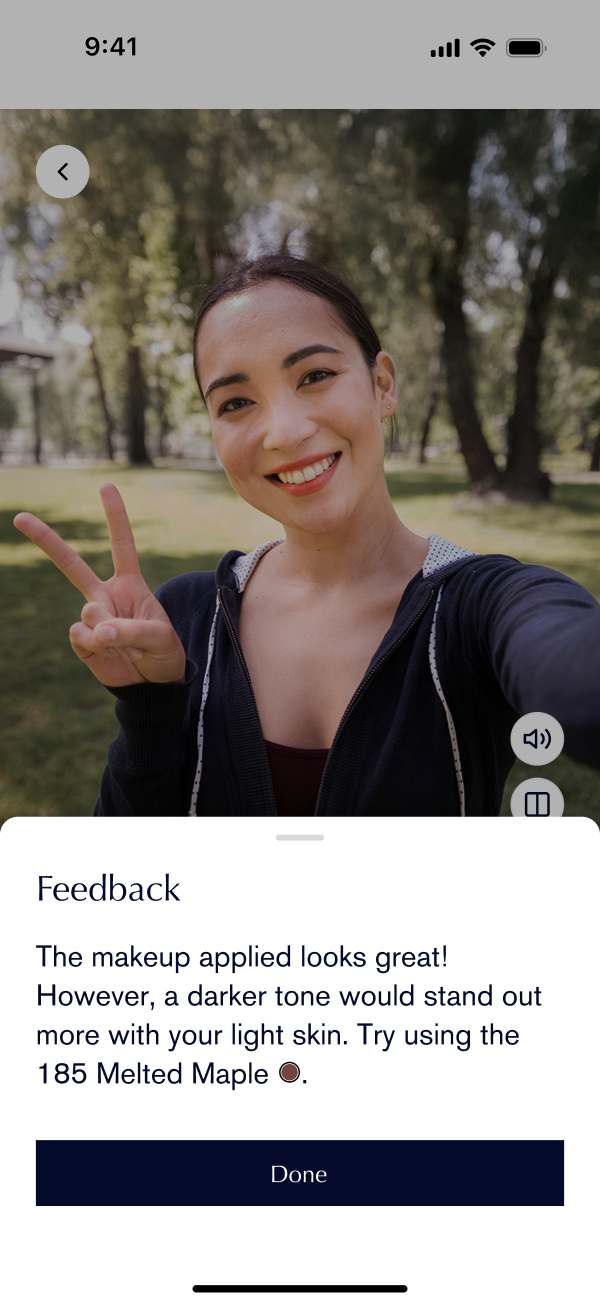
Clear audio feedback
The Virtual Try on tool now has a button to get audio feedback. This feature is useful for visually impaired customers who want to know which products fits them best.
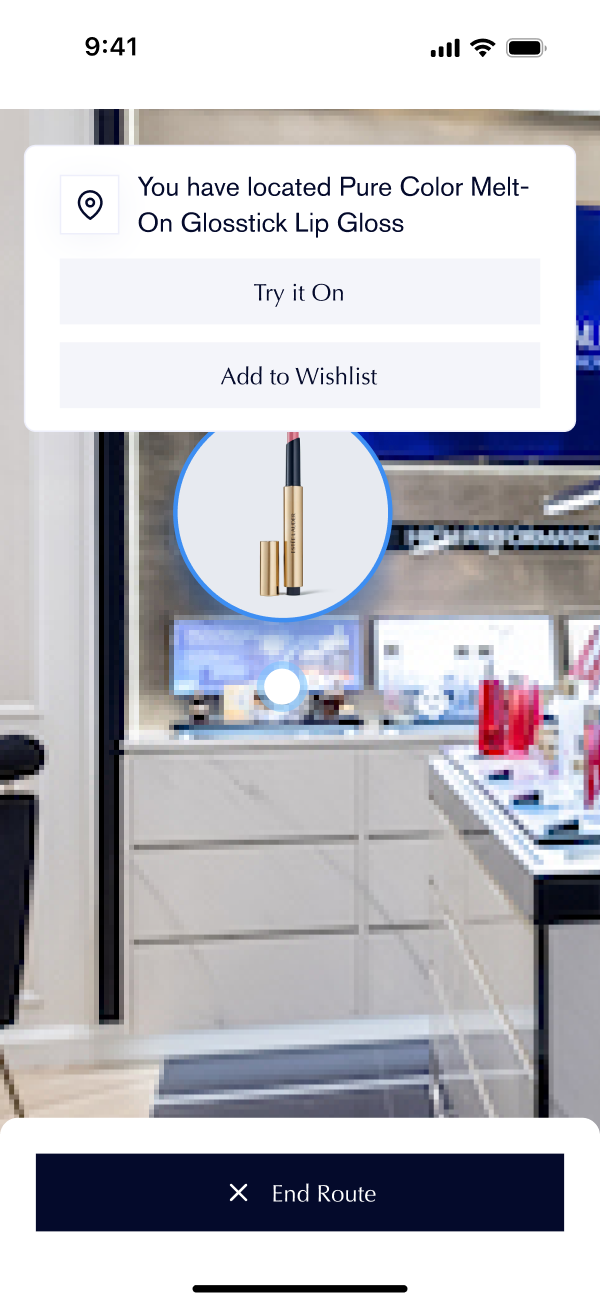
Purposeful CTAs
The Find in Store tool now includes an Add to Wishlist CTA, giving users the flexibility to save products for later or proceed directly to purchase.
Project Impact
Estée Lauder Shopping Assistant gained the spotlight not only by winning a honorable mention in Estée Lauder’s hackathon, but ensuring an effective user experience when performing different tasks on the app, and competitive business opportunities for the company.
User impacts
How the design makes the user's beauty shopping experience effective for customers with physical and visual disabilities.
- Lower cognitive load: Action are grouped and located in section that align with the user's mental models.
- Efficiency and clarity: Clear app hierarchy removes the confusion of users when performing the different actions.
- Accessibility and inclusiveness (post launch): Effective use of typography, colors, sizing and audio features.
- Trust and retention (post launch): Clear understanding of the user flow and effective customer support that increase the trust towards the product.
Business impacts (Hypothesis)
As part of the whole design of the app, the implementation is expected to influence the business's business opportunities once launched.
- Brand strength: Increase the reputation of Estée Lauder as a leading company in the accessibility sector.
- Revenue growth: In a billions of dollars industry, catering for 15% of the population brings business opportunities to the company.
- Customer satisfaction: Studies show that people with disabilities are loyal customers once they find brands that care for their needs.
Future Work
As an one-of-its-kind app, it is important to make constant usability tests which will reveal varying results depending on the demographics and locations that the tests will be performed at. Each demographic group has different levels of familiarity with technology, average age of customers, and physical features of the store that will reveal different insights and challenges into how each sector uses the app.
Also, learning about the problems that similar brands might have will uncover more business opportunities. Without any direct competitor, developing accessible solutions powered by technology definitely has a great area of opportunity in the market, which can be beneficial to look at.
Learning and Reflections
We are incredibly grateful for the opportunity to ideate a solution for people with mobility disabilities who want to enjoy the beauty shopping experience at Estée Lauder. Throughout the creation process, we gained valuable insights into the unique challenges faced by people with disabilities and were able to design an application that directly addresses their needs.
Overall, creating this project reminded us the importance of inclusive design and the potential that technology has in order to impact people’s lives in a positive way. We hope that ELSA serves as an inspiration for other people and companies to prioritize accessibility in their products and services.